Project archive / 11
Command-line Game
Retro command-line stag game
Welcome to the realm of the Retro Command-Line Stag Game, which combines nostalgia with interactive gameplay. Delve into the random rooms, honing your strategic skills to navigate obstacles and unlock achievements in this captivating 80s journey.
- Archive
- 11
- Category
- Command-line Game
- Result
- Data-driven command-line game
System / highlights
What I delivered.
- 01
Designed a retro command-line interface with configurable maps, entities, and actions.
- 02
Added server-client multiplayer, health, scoring, and progression systems.
- 03
Implemented fuzzy command matching and data-driven XML action parsing.
Archive / full note
Project notes.
Originally published May 8, 2022
A configurable multiplayer command-line adventure built with Java.
Introduction
Stag game is a command-line game implemented in Java, utilizing parser and game-object oriented programming principles. It can be initialized with a custom map, item and action which can be design entirely by the user. Also, it has a built in health system and a score system which can be used to keep track of the player's progress.
Multiplayer
The game can be played in multiplayer mode. The game can be played in multiplayer mode by running the Server class and the Client class. The Server class will run the game and the Client class will connect to the server and play the game.
Action Parsing
TO implement custom action, a xml file need to be created. example of a xml file is shown below.
1<?xml version="1.0" encoding="UTF-8"?>
2<actions>
3    <action>
4        <triggers>
5            <keyword>open</keyword>
6            <keyword>unlock</keyword>
7        </triggers>
8        <subjects>
9            <entity>trapdoor</entity>
10            <entity>key</entity>
11        </subjects>
12        <consumed>
13            <entity>key</entity>
14        </consumed>
15        <produced>
16            <entity>cellar</entity>
17        </produced>
18        <narration>You unlock the trapdoor and see steps leading down into a cellar</narration>
19    </action>
20
21    <action>
22        <triggers>
23            <keyword>chop</keyword>
24            <keyword>cut</keyword>
25            <keyword>cutdown</keyword>
26        </triggers>
27        <subjects>
28            <entity>tree</entity>
29            <entity>axe</entity>
30        </subjects>
31        <consumed>
32            <entity>tree</entity>
33        </consumed>
34        <produced>
35            <entity>log</entity>
36        </produced>
37        <narration>You cut down the tree with the axe</narration>
38    </action>
39
40    <action>
41        <triggers>
42            <keyword>drink</keyword>
43        </triggers>
44        <subjects>
45            <entity>potion</entity>
46        </subjects>
47        <consumed>
48            <entity>potion</entity>
49        </consumed>
50        <produced>
51            <entity>health</entity>
52        </produced>
53        <narration>You drink the potion and your health improves</narration>
54    </action>
55
56    <action>
57        <triggers>
58            <keyword>fight</keyword>
59            <keyword>hit</keyword>
60            <keyword>attack</keyword>
61        </triggers>
62        <subjects>
63            <entity>elf</entity>
64        </subjects>
65        <consumed>
66            <entity>health</entity>
67        </consumed>
68        <produced>
69        </produced>
70        <narration>You attack the elf, but he fights back and you lose some health</narration>
71    </action>
72
73</actions>
then, the xml file need to be parsed and the action need to be added to the game. This can be done by using the DocumentBuilder class.
1DocumentBuilder builder = DocumentBuilderFactory.newInstance().newDocumentBuilder();
2          Document document = builder.parse("basic-actions.xml");
Command parsing and fuzzy matching
The user interface is retro: the player types commands into a text field and the game responds. The game parses the command and tries to match it with the action in the game. If the command is not recognized, the game will try to find a fuzzy match for the command. The fuzzy matching is done by using the Levenshtein distance algorithm.
1## input example
2
3open trapdoor with key
4leave house and go north
5chop tree with axe
6drink potion
7fight elf
81// Levenshtein distance algorithm.
2public static int levenshteinDistance(String s1, String s2) {
3 int[][] dp = new int[s1.length() + 1][s2.length() + 1];
4
5 for (int i = 0; i <= s1.length(); i++) {
6 for (int j = 0; j <= s2.length(); j++) {
7 if (i == 0) {
8 dp[i][j] = j;
9 } else if (j == 0) {
10 dp[i][j] = i;
11 } else {
12 dp[i][j] = min(dp[i - 1][j - 1]
13 + costOfSubstitution(s1.charAt(i - 1), s2.charAt(j - 1)),
14 dp[i - 1][j] + 1,
15 dp[i][j - 1] + 1);
16 }
17 }
18 }
19
20 return dp[s1.length()][s2.length()];
21 }
22
23 public static int costOfSubstitution(char a, char b) {
24 return a == b ? 0 : 1;
25 }
26
27 public static int min(int... numbers) {
28 return Arrays.stream(numbers)
29 .min().orElse(Integer.MAX_VALUE);
30 }Map/Item Parsing
The map and item can be parsed from a .dot file, which is a graph description language. The .dot file can be created using the Graphviz software. The .dot file can be parsed using the Graphviz library.
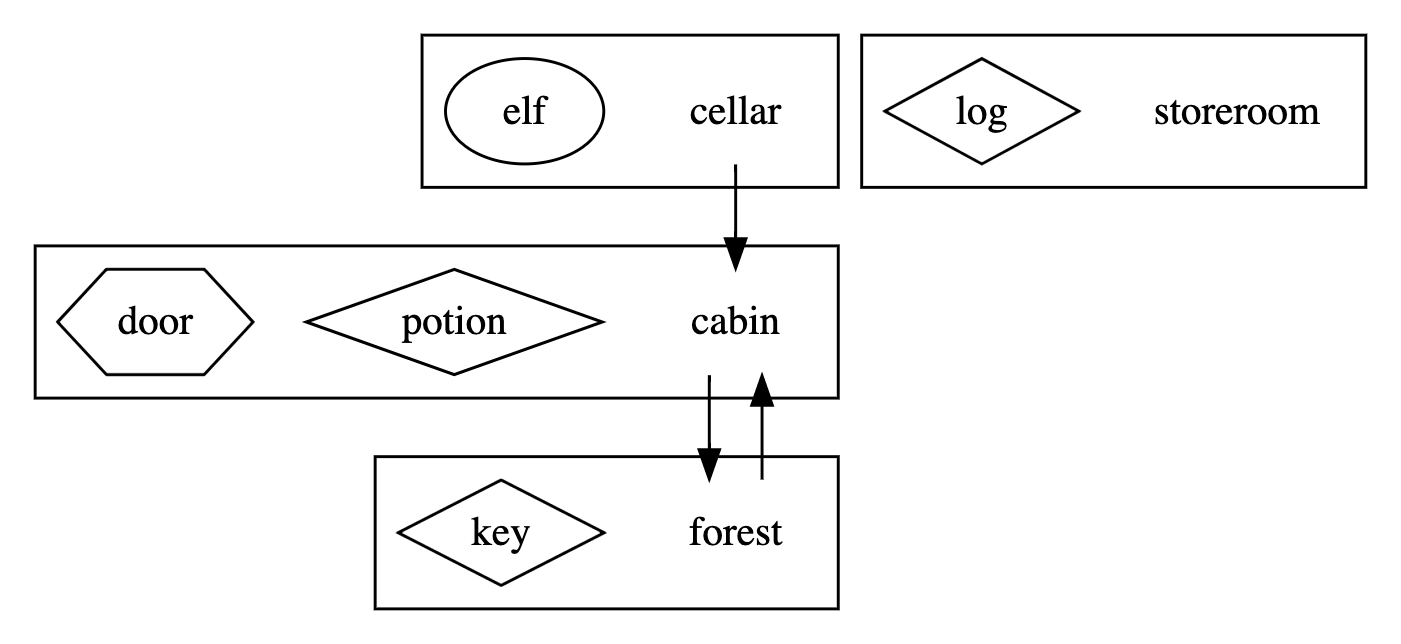
1digraph layout {
2    /* ortho splines just makes the arrows into straight lines (rather than curvy ones !) */
3    splines = ortho;
4    node [shape = "rect"];
5
6    subgraph locations {
7        subgraph cluster001 {
8            node [shape = "none"];
9            cabin [description = "An empty room"];
10            subgraph artefacts {
11                node [shape = "diamond"];
12                potion [description = "Magic potion"];
13            }
14            subgraph furniture {
15                node [shape = "hexagon"];
16                trapdoor [description = "Wooden trapdoor"];
17            }
18        }
19
20        subgraph cluster002 {
21            node [shape = "none"];
22            forest [description = "A dark forest"];
23            subgraph artefacts {
24                node [shape = "diamond"];
25                key [description = "Brass key"];
26            }
27        }
28
29        subgraph cluster003 {
30            node [shape = "none"];
31            cellar [description = "A dusty cellar"]
32            subgraph characters {
33                node [shape = "ellipse"];
34                elf [description = "Angry Elf"];
35            }
36        }
37
38        subgraph cluster999 {
39            node [shape = "none"];
40            storeroom [description = "Storage for any entities not placed in the game"]
41            subgraph characters {
42                node [shape = "ellipse"];
43            }
44            subgraph artefacts {
45                node [shape = "diamond"];
46                log [description = "A heavy wooden log"];
47            }
48            subgraph furniture {
49                node [shape = "hexagon"];
50            }
51        }
52    }
53
54    subgraph paths {
55        cabin -> forest;
56        forest -> cabin;
57        cellar -> cabin;
58    }
59
60}
Index / methods
Technology & methods.
- 01Java
- 02Command Parsing
- 03XML
- 04Graphviz
- 05Multiplayer
- 06Game Logic